RSS (Really Simple Syndication) is an open web feed format used to distribute frequently updated content such as blog posts, news articles, announcements, product updates, and other time-sensitive information. Although modern browsers no longer display RSS icons in the address bar, RSS feeds continue to be widely used by email marketing tools, SEO platforms, automation services, and feed readers.
An RSS feed is an XML file that contains structured content entries with titles, summaries, publication dates, and source information. Subscribers can use feed readers or automation platforms (such as Feedly, Zapier, IFTTT, Mailchimp, etc.) to monitor these feeds and receive automatic updates.
RSS has seen a resurgence as a way to privately and efficiently follow content without relying on social media algorithms. While some major platforms have removed their RSS support, it remains built into many content management systems and is actively used by millions of people who prefer to manage their own news and content streams.
Enabling the RSS Feed Link on Your Storefront
Pulse Commerce allows you to display an RSS link in your storefront navigation so customers and automation tools can subscribe to your site’s published content.
- Go to Content > Link Editor – Links.
- Locate the RSS link and enable it by checking the Visible checkbox.

Adding Custom Pages to Your RSS Feed
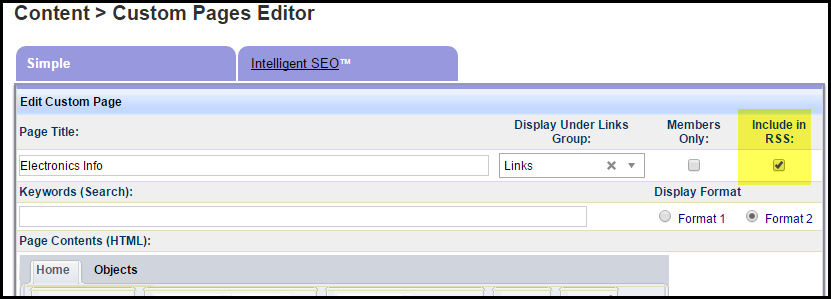
Pulse Commerce allows individual custom pages to be syndicated through your store’s RSS feed. This is helpful if you publish updates, news, or informational posts using Custom Pages.
- Navigate to Content > Custom Pages.
- Click Edit for the page you want to include.
- Check the box labeled Include in RSS.
- Click Update to save your changes.
Making Your RSS Feed Discoverable
Although browsers no longer show RSS icons automatically, adding the RSS feed as a <link> element in your site’s header helps search engines, automation tools, and feed readers detect your feed.
Add the following tag to the HTML section in:
Content Manager > Logo and Custom Header Editor > Top of Page Editor
<link rel="alternate" type="application/rss+xml"
      title="RSS Feed"
      href="https://<PrimaryURL>/CustomPages/rss/Features.rss">
Replace <PrimaryURL> with your store’s primary domain (e.g., www.example.com).
Once enabled, your RSS feed can be consumed by:
- RSS reader apps (Feedly, Inoreader, NetNewsWire)
- Marketing automation tools (Mailchimp, HubSpot, ActiveCampaign)
- Integration services (Zapier, Make.com)
- SEO and content monitoring tools
Additional reading: https://andrewblackman.net/2025/05/no-rss-isnt-dead/